Imagine taking guesswork out of your VA journey with an all-in-one dashboard to stay organized, track your work, and land MORE clients…

I became a virtual assistant even when I had no formal experience. But behind the scenes, I was scrambling – there was:
❌ No system,
❌ No structure,
… Just a growing fear I’d mess up.
That’s when I built the planner that changed everything.
Introducing…
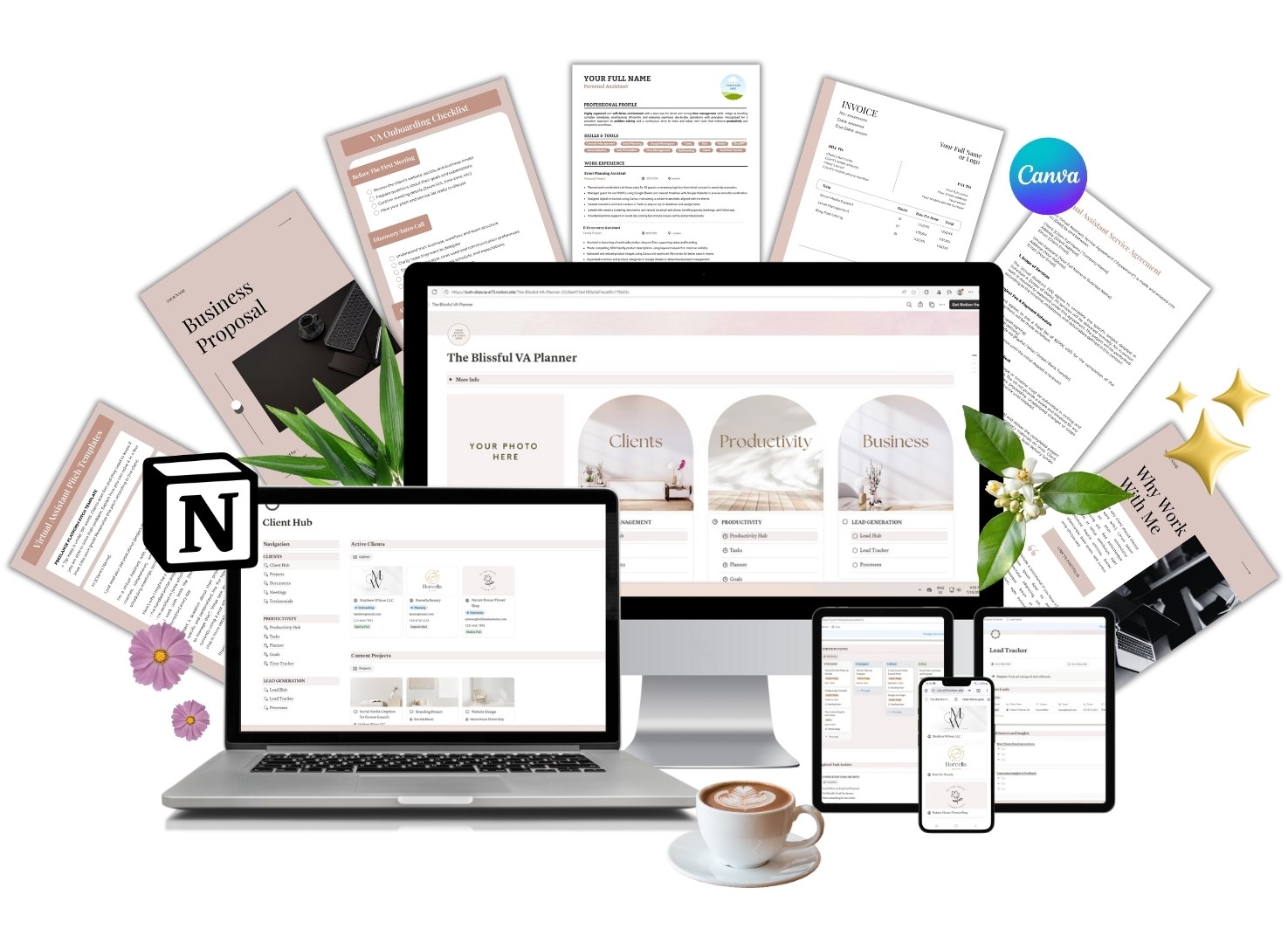
✨ The Blissful VA Planner ✨
What if you could…?
✔️ Find your first client without ugly spreadsheets and Post-it chaos?
✔️ Actually remember what you promised that client in the first place?
✔️ Look like you have your sh*t together (even on days you’re wearing pajama bottoms)?
✔️ Set up smooth systems that let you document and reuse workflows?
✔️ Confidently pitch yourself, land clients, and get rebooked over and over again?
This planner gives you all that, and more!
If you have any of these questions, this planner is for you:
➤ How do I organize all my client info in one place?
➤ How do I keep track of deadlines, meetings, and tasks without losing my mind?
➤ How do I pitch my services and follow up without forgetting who I contacted?
➤ How do I look professional when I’m just starting out?
➤ How do I track time spent on projects and bill for it?
➤ How do I set up systems so I’m not reinventing the wheel every time?
➤ How do I turn leads into paying clients and get rebooked?
✨ HERE’S WHAT YOU’LL GET ✨
When you purchase The Blissful VA Planner, you get instant access to an all-in-one Notion dashboard with the following sections:
✅ CLIENT HUB
– A Client Hub to organize all your contacts in one place
– A Project Dashboard to plan deliverables, deadlines, and progress
– A meeting tracker to record notes, action items, and follow-ups
– A Testimonial Hub to collect glowing reviews and use them in your marketing
✅ LEAD HUB
– A Lead Hub to track every contact, pitch, and opportunity
– A lead conversion checklist to attract, convert, onboard, and offboard clients
– A Client Journey Tracker to turn prospects into clients
– A Processes section to document and streamline your workflows
✅ PRODUCTIVITY HUB
– Daily, weekly, and monthly task manager so you don’t miss anything
– A smart manager that covers daily to monthly to-dos
– A goal tracker to help you stay focused and get things done
– A time tracker to log billable hours like a boss
PLUS, YOU GET THESE FULLY CUSTOMIZABLE CANVA TEMPLATES TO ONBOARD CLIENTS LIKE A PRO!

VA Resume
The exact CV that got me hired, with no experience.
Template Pitches
Use them in freelance platforms and cold emails.
Business Proposal
To set clear expectations and show your value.
Contract Template
To protect yourself and avoid scope creep.
Invoice Template
Get paid faster with a clear and professional invoice.
Zoom & Meet Backgrounds
Fully customizable backgrounds to maintain your branding on point.
PLANNER + BONUSES VALUE = $197.
YOURS TODAY FOR ONLY
$57!

About The Author
Hi!, I’m Irene Kühne, and after years of working as a freelance translator, I watched my industry shift almost overnight with the rise of AI. My income dropped and I found myself searching for a new way to make ends meet. That’s when I discovered the world of virtual assistance.
With no formal experience, I landed my first client in just one week, but staying organized and professional was another story. I needed a system to manage everything: tasks, clients, offers, and leads. So I built the planner I wish I had from day one.
Now, I bring in steady income as a VA, and I created this planner to help you do the same. Whether you’re just starting out or need to streamline your workflow, this Notion template will help you show up like a pro, impress clients, and grow your business with confidence.
THIS IS FOR YOU IF…
✅ You’re feeling overwhelmed by all the moving pieces
✅ You don’t know how to present yourself professionally to clients (yet!)
✅ You need a way to track time and manage projects efficiently
✅ You’re tired of starting from scratch every time you land a new client
✅ You want to build a foundation that helps you grow steadily
THIS IS NOT FOR YOU IF…
❌ You are a fully booked virtual assistant
❌ You’re not open to using digital tools like Notion to manage your business
❌ You prefer to keep all your client info in your head (and hope for the best)
❌ You’re not interested in growing or scaling your VA business
❌ You’re looking for a quick fix instead of a sustainable system
FREQUENTLY ASKED QUESTIONS
Who is this planner for?
This is for aspiring and beginner virtual assistants who need an all-in-one dashboard to manage their business. It’s also perfect for VAs who already have clients but feel scattered and want a system to streamline their work and scale with confidence.
How will I receive the planner?
Once you complete your purchase via Gumroad, you’ll receive an instant download link via email. From there, you’ll get access to a Notion link with clear instructions on how to duplicate the template into your own Notion workspace. It’s quick and beginner-friendly!
Do I need a paid Notion account?
Nope! Everything works perfectly on the free Notion plan.
Can I get a refund?
Due to the digital nature of this product, all sales are final and non-refundable. If you have any doubts before purchasing, feel free to contact me—I’m happy to answer your questions to make sure it’s right for you.
Is this suitable for me if I’m just starting out?
Absolutely. This planner was created by someone who started from zero—just like you. It’s designed to help beginner VAs kickstart their business with structure, clarity, and a professional edge from day one.
Can I customize it?
Yes! You can fully customize the planner to match your brand—edit the colors, layout, text, and more to suit your workflow. However, please note that this version does not include resell rights. You may use it for your own business, but you may not resell, redistribute, or share the template.
Can I use this planner for multiple clients?
Yes! The template is designed to manage multiple clients at once. You can duplicate pages as needed to keep everything organized per project or per client.
Where are my bonuses?
All bonuses are already included inside the planner! You’ll find them in the “Processes” section under the Productivity Hub.