When I noticed that I was not capable of making ends meet, I started looking for new ways of making money and came across virtual assistance. I started promoting myself as a VA on freelancing platforms and guess what: I made $500 in my first week and now bring home an extra $1,200 each month! In this post, I will teach you step by step how to become a virtual assistant with no experience, just like I did.
PIN THIS POST TO READ IT LATER!

DISCLAIMER
This post may contain affiliate links, which means I’ll receive a commission if you purchase through my links, at NO extra cost to you. Read my Disclaimer for more information. Hope you find this post useful!
RELATED POSTS:
- How To Onboard A New Client As A Pro Virtual Assistant In 6 Easy Steps!
- How To Make A Virtual Assistant Website For Free (Even If You’re Not Tech-Savvy)
How To Become A Virtual Assistant With No Experience
With the rise of AI, several people lost their jobs, and I was not the exception.
If you don’t know me yet, I’m a professional translator and have always offered my translation services as a freelancer.
The translation industry was booming years ago, but not anymore: with the new AI tools, now clients opt for fast results instead of quality and turn to artificial intelligence to translate documents for them.
As a result, my workload suffered, and I started receiving less money.
I was becoming desperate, because I needed money to make ends meet – the paycheck I was receiving from my translations just was not enough to cover my expenses.

That’s when I started looking for new ways of bringing money home and noticed that several clients were looking for virtual assistants on freelancing platforms.
I thought, ‘This is my opportunity!’
Without hesitating, I got down to work – how could I start offering virtual assistance services and promoting myself in a compelling manner?
Fast forward a few days, I closed a deal with my first client for a monthly retainer of $500 – YES, in my first week!
Now, I have two clients and bring a steady $1,200 home.
This new income stream was what I needed to provide for myself financially and made all the difference.
That’s why in this post, I will teach you how to become a virtual assistant with no experience, step by step, with all the tips and tricks that helped me land my first client.
Here’s a short virtual assistant tutorial for beginners to start right away:
- Acquire the desired skills
- Know the tools you’ll work with
- Set up your workstation
- Pick a niche
- Set your rates
- Create a LinkedIn profile
- Create a simple website and a professional email
- Create your client acquisition toolkit
- Find your first client
✨Wanna Speed Up the Process?
Skip the guesswork with Ready, Pitch, Hired!: my practical guide to finding, approaching, and landing your first VA clients, even with no previous experience. You’ll learn where to find opportunities, how to pitch yourself, stand out, avoid scams, and turn your existing skills into reasons to hire you. Plus, you’ll get ready-to-use resume, pitch, proposal, contract, and invoice templates to find and onboard your first client as a pro. Click below to access your guide!
1. Acquire The Desired Skills

As a VA, you should have certain skills to succeed in the virtual assistant world. Here are the top ones:
Communication = Client Trust
To succeed as a virtual assistant, strong communication skills are a must to build trust.
This means being able to write clearly and professionally, actively listen to client needs, and respond in a timely and respectful manner.
Be The Queen Of Structure
If you want to be a successful VA, girl, you’d better hone your organization and time-management skills!
As a VA, you may juggle multiple clients or projects, so staying on top of deadlines, calendars, and daily tasks is key.
Don’t Fear The Software
Being tech-savvy is also important.
You don’t need to be a tech expert, but you should feel confident using common tools like Zoom, Slack, Canva, and cloud storage platforms.
Every client uses a slightly different setup, so the ability to learn new software quickly is a big advantage.
Spot It Before They Do
Your job as a VA is to make things easier for your clients, so attention to detail is invaluable.
Whether you’re proofreading content, formatting a document, or updating a spreadsheet, small mistakes can lead to serious issues.
Clients rely on you to have an eagle eye for details, catching errors or inconsistencies.
Be One Step Ahead
Clients love VAs who take initiative and figure things out independently.
They just don’t want to micromanage you and lose time.
They need someone who offers suggestions, acts proactively, and finds solutions on their own.
Taking ownership of your role, rather than just following instructions, is what sets great VAs apart.
Be Reliable And Trusted

Discretion in the virtual assistance world is non-negotiable.
As a VA, you’ll often handle sensitive client information, internal processes, or inboxes.
Being reliable and respectful not only protects your clients but also protects your reputation and trustworthiness.
Empathy Is Your Secret Weapon
Emotional intelligence is a total game-changer for VAs.
It helps you pick up on the tone behind a client’s message, stay cool when things get hectic, and take feedback calmly.
Being kind and patient, especially when a client is stressed or unclear, makes a big difference.
It’s all about making your clients feel like they’re heard and in good hands.
Master Your Hard Skills Too
Hard skills are what show you can actually do the job.
Whether you want to be a social media, medical, real estate, or admin VA, you need to polish your hard skills to get the job done, like using Canva to design social media graphics, updating a WordPress blog, managing inboxes in Gmail, or creating spreadsheets in Google Sheets.
Feeling confident using (or learning to use) different tools and platforms is what makes you stand out right away.
2. Know The Tools You’ll Work With

According to your VA niche, you’ll need to be able to work with certain tools and platforms.
There are plenty of them, but these are the most popular ones.
Take your time to explore them and know their features:
- Google Workspace: This includes Gmail, Google Calendar, Docs, Sheets, and Drive. These are all essential tools for communication, scheduling, collaboration, and file sharing with clients. I use it daily!
- Trello / ClickUp / Asana: These are project management tools that help you stay organized and on top of tasks and deadlines. With them, you can track work like a pro.
- Slack / Zoom: Used for video calls, client check-ins, and virtual meetings. They are great for day-to-day updates.
- WordPress: If your clients run a blog or website, you might help upload blog posts, update images, or make light edits in their WordPress site.
- Salesforce / HubSpot / Zoho: These are client relationship management (CRM) tools that help businesses manage their contacts, sales pipeline, marketing, and customer service, all in one place.
- Stripe / PayPal / Wise: These platforms allow you to send invoices, accept payments, and handle international transactions on behalf of your clients. Use them to receive your VA compensation too!
3. Set Up Your Workstation

Setting up your workstation is pretty easy.
You just need:
- A laptop (or desktop)
- A reliable Internet connection
- Headphones (or even better – a headset).
Don’t try to get the top gear and gadgets; you don’t need all of that.
Just get the basic kit to get started.
What I’d add to this list is an amazing all-in-one digital planner like this one to organize all your tasks, to-dos, projects, deadlines, and client info in one place.
4. Pick A VA Niche
Now that you have an understanding of the basic tools, software, and hardware you need to get started, you have to pick a VA niche to work in.
Not sure which one to pick? I made a quiz so you can discover the right VA niche for you!

In addition to the quiz, this table breaks down the common virtual assistant roles and responsibilities for each VA niche so you can see what the day-to-day might actually look like:
| VA Niche | VA Tasks and Duties |
| Admin VA | • Manage calendars and emails • Organize digital files • Book appointments • Prepare reports • Handle data entry • Track deadlines |
| Social Media VA | • Schedule and publish posts • Engage with followers • Create content calendars • Monitor analytics • Design graphics • Write captions |
| E-commerce VA | • Update product listings • Track inventory • Handle returns • Manage product descriptions • Set up discount codes • Upload new products |
| Customer Service VA | • Respond to customer inquiries • Manage live chat • Track support tickets • Resolve complaints • Update FAQs • Log service issues |
| Content Creation VA | • Write blog posts • Create social media graphics • Design lead magnets • Update website content • Draft newsletters • Edit written content |
| Podcast & Video VA | • Edit podcast episodes • Edit video clips • Create show notes • Upload to platforms • Design episode graphics • Manage transcripts |
| Real Estate VA | • Organize property listings • Schedule property showings • Prepare client documents • Handle CRM updates • Research property data • Follow up with leads |
| Bookkeeping VA | • Track expenses • Prepare invoices • Reconcile accounts • Record transactions • Generate financial reports • Manage receipts |
| Medical VA | • Schedule appointments • Organize medical records • Follow up with patients • Update health forms • Send reminders • Track billing data |
5. Set Your Rates

There are three ways of charging your clients:
- By the hour
- By project
- By a retainer
By The Hour
Hourly virtual assistant rates vary according to experience and responsibilities, but the usual range is $10-$35 per hour.
I personally charge $30 per hour, and I have never worked as a virtual assistant before.
Don’t undercharge. Remember that you have to pay the bills!
By Project
Charging by project means you charge a flat fee for a defined task or deliverable, regardless of hours.
This way of charging is suitable for short-term clients and occasional collaborations.
An easy way of charging by project is determining how many hours it is going to take you to do the task(s), then multiplying that by your hourly rate.
Let’s say a client wants you to set up HubSpot for their company and import Mailchimp contacts into the platform.
If this takes you 5 hours and your hourly rate is $20, then $20 x 5 = the client is charged $100.
By A Retainer
This way of charging is suitable for long-term clients and ongoing work – it basically entails charging a set monthly fee for a certain number of hours or services.
I like to charge by retainer because it brings me stability and allows me to know exactly how much I’ll earn each month.
To give you an example, with my two clients, we agreed on 2 hours of virtual assistance per day (Monday through Friday) on a long-term basis, which means: $30 x 20 days = $600 per client/month.
6. Create A LinkedIn Profile

LinkedIn is the top platform for professional networking, so having a profile there is a no-brainer for anyone looking to learn how to become a virtual assistant with no experience.
It acts like an online resume, helps you get discovered by potential clients, and boosts your reputation as a professional VA.
Don’t overthink your LinkedIn profile — just start with the basics: a friendly photo with a clear background where you’re smiling, a short summary of who you help and how, and a list of your skills.
If you don’t have experience, don’t panic. I was in the same boat and had to think of the abilities I already had that could serve me to make my profile.
Let’s see:
- I started this blog as a hobby, and this involved having an excellent grasp of SEO and copywriting.
- I had finished an email marketing course and Google Ads training too.
- I also had assisted with the daily tasks of my family’s business for some time.
I used all this to make my profile and also my resume!
See?
The thing here is to leverage existing skills, hobbies, and personal traits to find a job in a suitable VA niche.
Here are some examples that you can use to highlight your skills, even if you don’t have formal experience:
- You created a content calendar for your own Instagram and managed to increase followers and likes.
- You built a personal blog using WordPress and customized layout, formatted content, and used basic SEO.
- You helped a friend launch an Etsy shop by writing product listings, uploading images, and organizing the storefront.
- You organized and managed a family calendar with appointments, events, and reminders using Google Calendar and Trello.
- You planned a wedding/birthday/family event, coordinating RSVPs, vendors, timelines, and budget tracking in Excel or Notion.
- You created digital folders and naming systems to organize personal documents, photos, and files in Google Drive.
- You volunteered to answer questions and support members in an online community or Facebook group.
You get the idea. Use anything to build your profile and start connecting to potential clients.
7. Create A Simple Website And A Professional Email
Yes — might sound daunting, but creating a simple website to showcase what you do + a professional email is actually very easy and KEY if you want to learn how to become a virtual assistant with no experience.
The best part is that you don’t need to break the bank to set them up!
My favorite tool to build simple websites is Carrd.
For just $19/year (you read that right), with Carrd Pro Standard plan, you can have a pretty and fully responsive website with a custom domain and no Carrd branding.
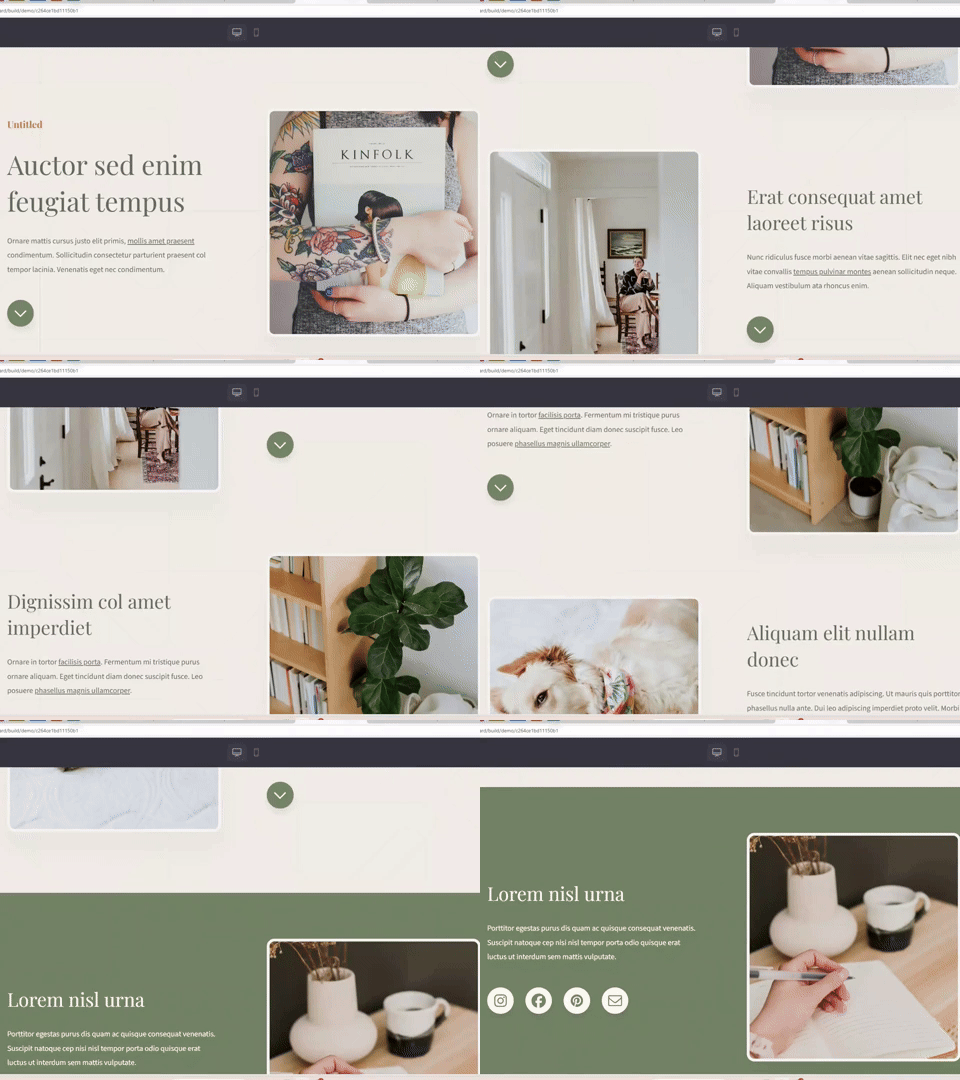
Setting up your website is very easy – just pick a one-page template and input your contact info, social media links, a short description of who you help + a list of your services.
See how neat this Carrd website template looks!
Source: Carrd
Don’t waste time and build your website with Carrd today!
RELATED POST:
Now, for your custom domain and professional email, you can get them from Namecheap.
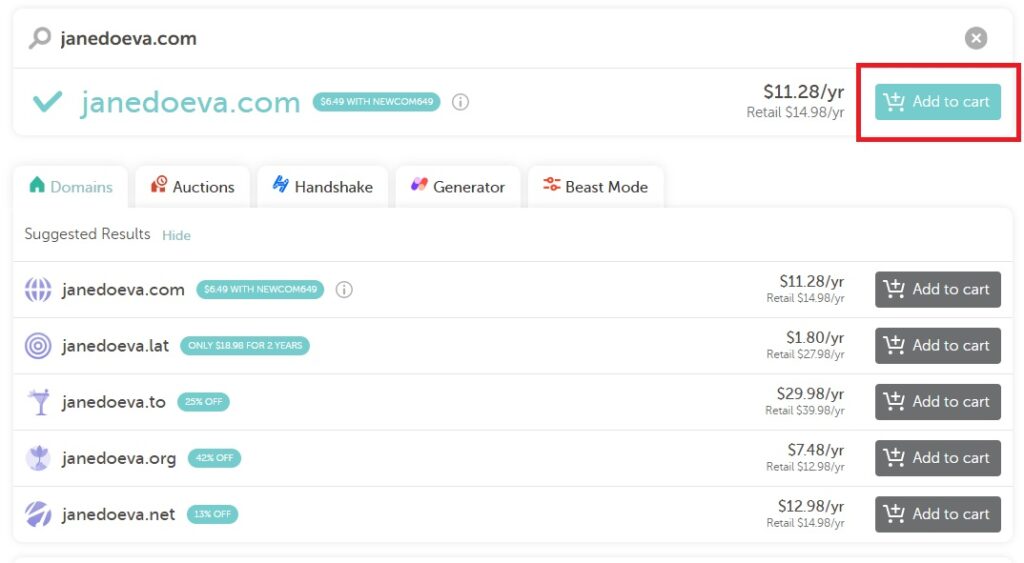
A custom domain in Namecheap, like your name + “VA” (“janedoeva.com”), costs around $11 a year.
Just type your domain name and see if it’s available:
Source: Namecheap
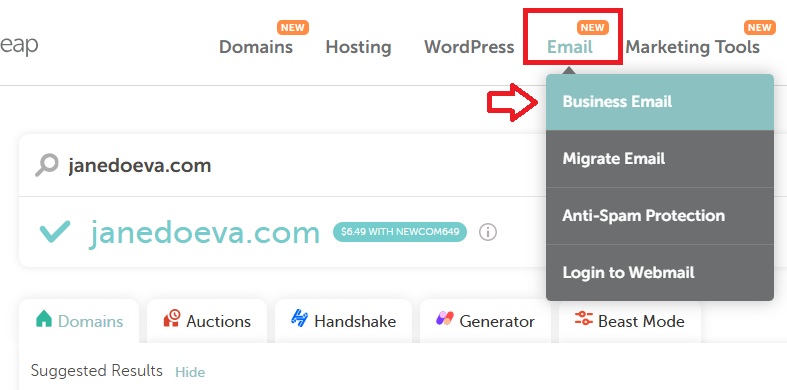
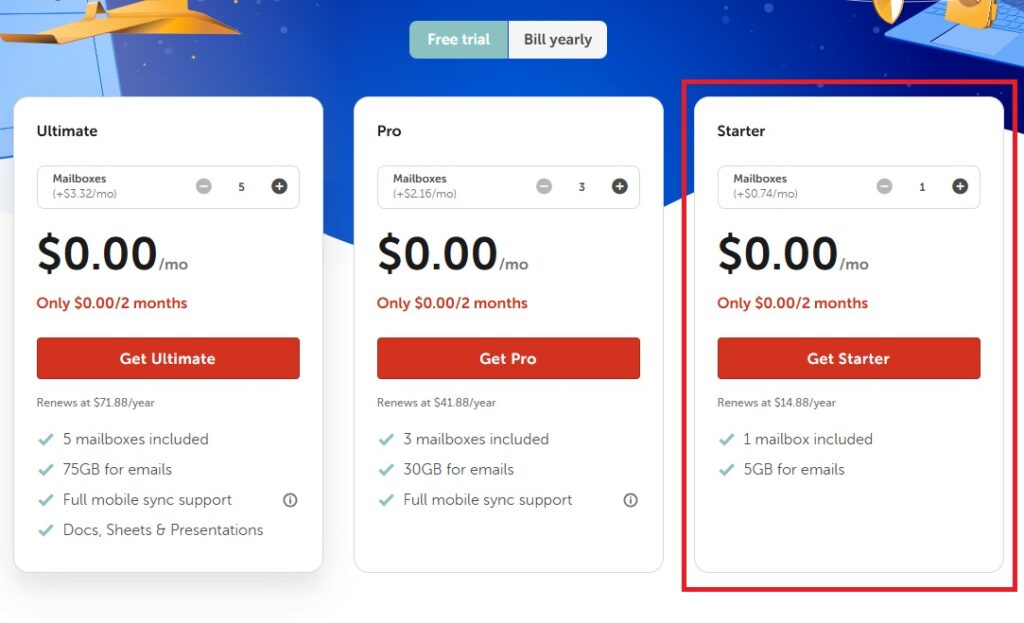
Once you purchase your custom domain, get your professional email — it costs $15 a year (pick the Starter plan with free trial):
Source: Namecheap
Source: Namecheap
To use your custom email, you have to set the DNS records first. Sounds complex, but it’s not.
Here’s how to do it:
3) In the section Advanced DNS go to → Host Records → Add New Record. Use this info to complete the fields:
- Host: default._domainkey
- Record type: TXT
- Value: the DKIM you copied earlier.
That’s it.
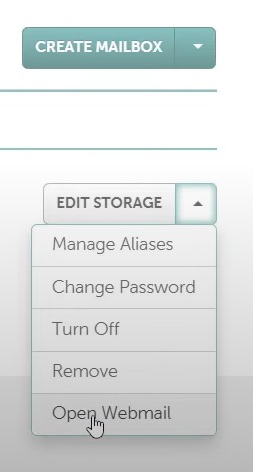
Then you can log in with your new credentials in Private Email to access your inbox:
Source: Namecheap
Still too complex? Send me a message at hello@bizandbliss.com and I’ll set up your professional website and email for a small fee!
8. Create Your Client Acquisition Toolkit

We are almost there! Before the last step, which is getting your first client, you have to be prepared beforehand with a basic client acquisition toolkit.
This includes:
- A Pitch Template
- A Resume Template
- A Business Proposal Template
- A Contract Template
- An Invoice Template
I know that designing these docs may take some time, so I prepared a template kit that you can edit and use right away. More info in the following step!
9. Find Your First Client

You’ve got the skills and picked your niche. You know what to charge. You’ve created your professional presence and prepared the basics you’ll need to work with clients.
Now comes the part that actually turns all of that preparation into income: finding someone willing to hire you.
And this is where many aspiring virtual assistants get stuck, because knowing how to be a virtual assistant and knowing how to get clients are two very different things.
Where should you look for clients? How do you find opportunities when you have no VA experience yet? And how do you write a pitch that doesn’t sound desperate when you’re competing with dozens of other freelancers for the same job?

I had all of these questions when I started.
But after figuring out where to look, how to present my existing skills, and how to approach potential clients, I landed my first VA client within my first week, on a $500 monthly retainer.
And that’s exactly why I created the guide Ready, Pitch, Hired!: A Practical Guide to Landing Your First VA Client.
It’s the next step after this tutorial: a practical guide designed to help you go from “I’m ready to become a VA” to actually looking for, approaching, and landing paying clients.
Inside, you’ll learn:
✅ Where to find potential VA clients
✅ How to look for opportunities even if you have no previous VA experience
✅ How to approach potential clients without feeling awkward or salesy
✅ How to write a compelling pitch instead of sending generic applications
✅ How to use platforms like LinkedIn and freelance websites and how to avoid scam projects
✅ How to turn your existing skills and experience into reasons for a client to hire you
Plus, you’ll get the practical templates you need so you don’t have to create everything from scratch:
- A Resume: An updated CV that shows your relevant skills and background.
- A Contract Template: A customizable agreement that outlines the scope of work, payment terms, deadlines, and responsibilities.
- An Invoice Template: A clean template to send invoices for your services.
- A Pitch Template: Pre-written email or DM templates to reach out to potential clients on platforms like LinkedIn, Upwork, or via email.
- A Business Proposal template: summarize everything discussed with the client in a business proposal outlining the scope of work, your rates, why they should work with you, and the next steps to start the collaboration.
You already know how to get started as a VA. Now it’s time to get BOOKED 🤑
Wrapping Up: How To Become A Virtual Assistant With No Experience
So this blog post was all about how to become a virtual assistant with no experience!
There are no excuses not to begin offering your services as a VA.
It’s always the perfect time to add a new income stream — especially one that gives you flexibility, independence, and the chance to grow at your own pace.
Start small, stay consistent, and remember: every expert VA once started with zero experience too!
You’ve got this.
DON’T FORGET TO PIN THIS POST!


Leave a Reply